# Definindo o Período Ativo

<span style="color: rgb(0, 0, 0); font-family: Arial; font-size: small;"><iframe allowfullscreen="allowfullscreen" height="314" src="https://www.youtube.com/embed/hs80v6wLOgw" width="560"></iframe>

</span>

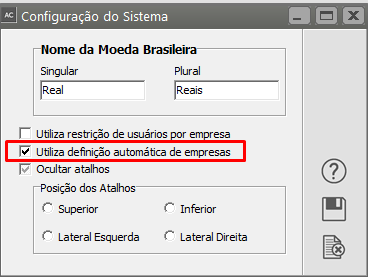
<span style="color: rgb(0, 0, 0); font-family: Arial; font-size: small;">Se no menu **Utilitários&gt;Configurações do Sistema**</span>

[![image.png](https://autoatendimento.grupoallegus.com.br/uploads/images/gallery/2023-10/scaled-1680-/nGpimage.png)](https://autoatendimento.grupoallegus.com.br/uploads/images/gallery/2023-10/nGpimage.png)

<span style="color: rgb(0, 0, 0); font-family: Arial; font-size: small;">você tiver configurado para utilizar definição automática de empresas, </span>

[![image.png](https://autoatendimento.grupoallegus.com.br/uploads/images/gallery/2023-10/scaled-1680-/ZmBimage.png)](https://autoatendimento.grupoallegus.com.br/uploads/images/gallery/2023-10/ZmBimage.png)

<span style="color: rgb(0, 0, 0); font-family: Arial; font-size: small;">Ao acessar o Sistema, </span><span style="color: rgb(0, 0, 0); font-family: Arial; font-size: small;">automaticamente, será aberta a tela para que você defina o período ativo</span>

[![image.png](https://autoatendimento.grupoallegus.com.br/uploads/images/gallery/2023-10/scaled-1680-/fg2image.png)](https://autoatendimento.grupoallegus.com.br/uploads/images/gallery/2023-10/fg2image.png)

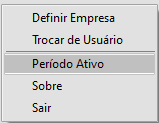
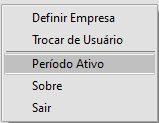
<span style="color: rgb(0, 0, 0); font-family: Arial; font-size: small;">Ou, se durante os processos que estiverem sendo realizados houver necessidade de mudar o período ativo em que você irá trabalhar, clique com o botão direito do mouse no centro da tela e o sistema abrirá a mesma tela para que você consiga mudar o Período Ativo</span>

[![image.png](https://autoatendimento.grupoallegus.com.br/uploads/images/gallery/2023-10/scaled-1680-/CHjqDRimage.png)](https://autoatendimento.grupoallegus.com.br/uploads/images/gallery/2023-10/CHjqDRimage.png)

<span style="color: rgb(0, 0, 0); font-family: Arial; font-size: small;">Você somente poderá cadastrar e editar documentos cujas datas estejam dentro do período definido.</span>

<span style="color: rgb(0, 0, 0); font-family: Arial; font-size: small;">A definição do período será solicitada cada vez que você for definir uma empresa e poderá ser alterada a qualquer momento através do menu de acesso rápido, clicando com o botão direito do mouse:</span>

<span style="color: #003399; font-family: Arial; font-size: small;">.</span>