# Imprimindo as informações cadastrais dos clientes do escritório contábil

**<span style="color: rgb(0, 0, 0); font-family: Arial; font-size: small;"><iframe allowfullscreen="allowfullscreen" height="314" src="https://www.youtube.com/embed/sVdPQ99d6kA" width="560"></iframe>

</span>**

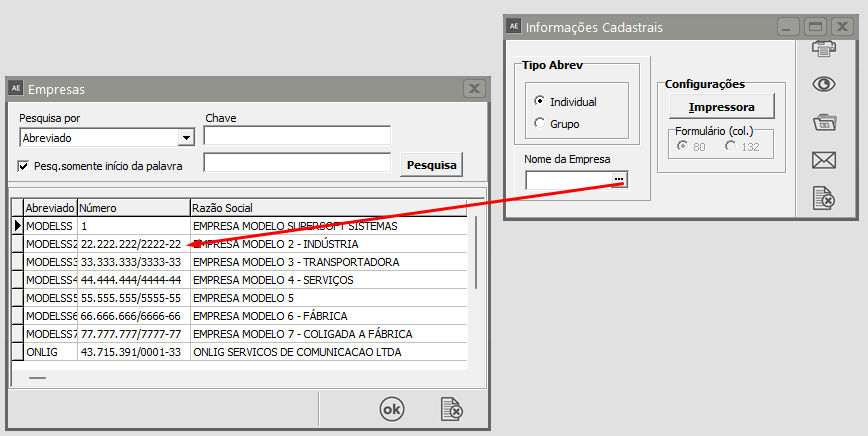
<span style="color: rgb(0, 0, 0); font-family: Arial; font-size: small;">Para imprimir as informações Cadastrais dos Clientes acesse o relatório através do menu **Relatórios/Informações Cadastrais**.</span>

[![image.png](https://autoatendimento.grupoallegus.com.br/uploads/images/gallery/2023-08/scaled-1680-/aukimage.png)](https://autoatendimento.grupoallegus.com.br/uploads/images/gallery/2023-08/aukimage.png)

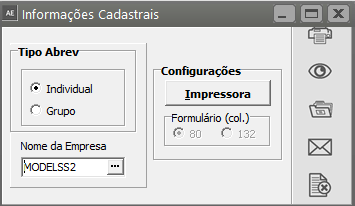
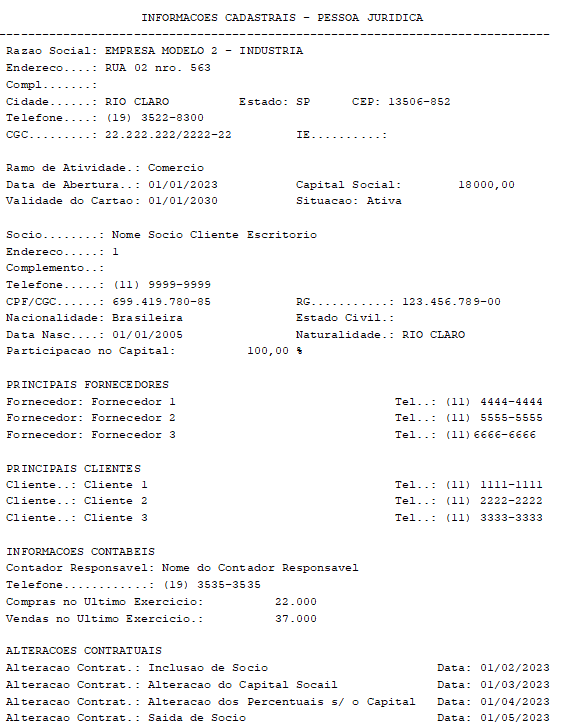
<span style="color: rgb(0, 0, 0); font-family: Arial; font-size: small;">Você pode imprimir uma relação com todos os dados cadastrais da Empresa, além de dados de Sócios, para atender solicitação de um banco, por exemplo. Basta somente definir uma empresa.</span>

[![image.png](https://autoatendimento.grupoallegus.com.br/uploads/images/gallery/2023-08/scaled-1680-/LWEimage.png)](https://autoatendimento.grupoallegus.com.br/uploads/images/gallery/2023-08/LWEimage.png)

[![image.png](https://autoatendimento.grupoallegus.com.br/uploads/images/gallery/2023-08/scaled-1680-/lI5image.png)](https://autoatendimento.grupoallegus.com.br/uploads/images/gallery/2023-08/lI5image.png)
[![image.png](https://autoatendimento.grupoallegus.com.br/uploads/images/gallery/2023-08/scaled-1680-/79yimage.png)](https://autoatendimento.grupoallegus.com.br/uploads/images/gallery/2023-08/79yimage.png)
**<span style="color: rgb(0, 0, 0); font-family: Arial; font-size: small;">Veja também o Item:</span>**

<span style="color: rgb(0, 0, 0); font-family: Arial; font-size: small;">-[ Parametrizando Empresa](https://autoatendimento.grupoallegus.com.br/books/adecon/page/parametrizando-a-empresa)</span>