# Configurando o Sistema

<span style="color: rgb(0, 0, 0); font-family: Arial; font-size: small;"><iframe allowfullscreen="allowfullscreen" height="314" src="https://www.youtube.com/embed/uyPe67j5SCA" width="560"></iframe>

</span>

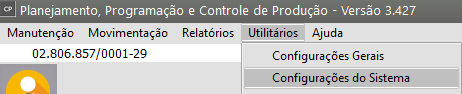
<span style="color: rgb(0, 0, 0); font-family: Arial; font-size: small;">Nas configurações do Sistema você definirá o funcionamento do sistema com relação a diversos aspectos. Essas informações serão válidas para **todas as suas empresas**. Para isso, entre no menu **Utilitários/Configurações.**</span>

[![image.png](https://autoatendimento.grupoallegus.com.br/uploads/images/gallery/2023-12/scaled-1680-/Uoximage.png)](https://autoatendimento.grupoallegus.com.br/uploads/images/gallery/2023-12/Uoximage.png)

[![image.png](https://autoatendimento.grupoallegus.com.br/uploads/images/gallery/2023-12/scaled-1680-/Pblimage.png)](https://autoatendimento.grupoallegus.com.br/uploads/images/gallery/2023-12/Pblimage.png)
<span style="color: rgb(0, 0, 0); font-family: Arial; font-size: small;">  
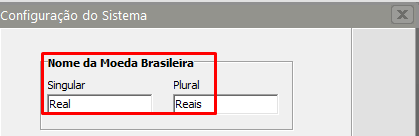
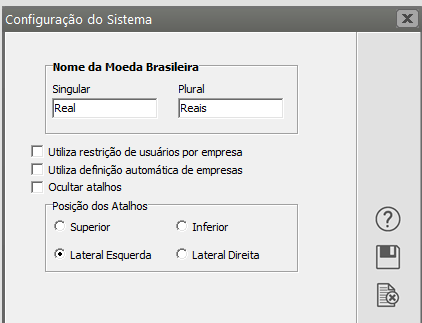
**Nome da Moeda Brasileira:** Informe o nome da moeda nacional corrente no singular e no plural.</span>

[![image.png](https://autoatendimento.grupoallegus.com.br/uploads/images/gallery/2023-12/scaled-1680-/eW1image.png)](https://autoatendimento.grupoallegus.com.br/uploads/images/gallery/2023-12/eW1image.png)

<span style="color: rgb(0, 0, 0); font-family: Arial; font-size: small;">  
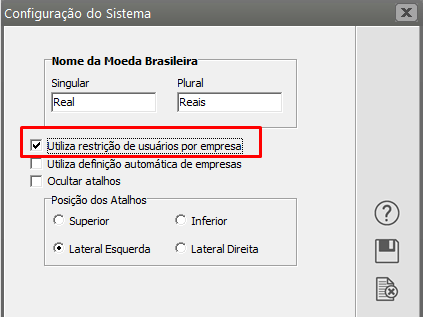
**Utiliza Restrição de usuários por empresa:** Isso significa que você poderá determinar a cada usuário a empresa a qual terá acesso. Veja mais informações em [Controlando Usuários do Sistema.](https://autoatendimento.grupoallegus.com.br/books/cp/page/controlando-os-usuarios-do-sistema)</span>

[![image.png](https://autoatendimento.grupoallegus.com.br/uploads/images/gallery/2023-12/scaled-1680-/n3yimage.png)](https://autoatendimento.grupoallegus.com.br/uploads/images/gallery/2023-12/n3yimage.png)

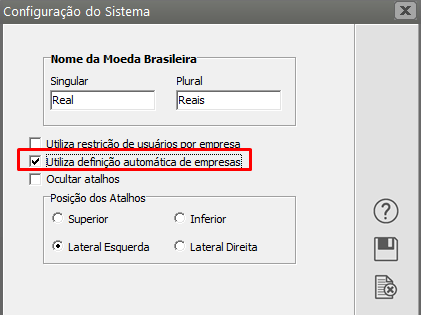
<span style="color: rgb(0, 0, 0); font-family: Arial; font-size: small;">**Utiliza definição automática de empresas:** Se essa opção estiver assinalada, quando você inicializar o sistema, a empresa que você estava utilizando da **última vez** será definida **automaticamente**, de acordo com o usuário. Por exemplo:</span>

[![image.png](https://autoatendimento.grupoallegus.com.br/uploads/images/gallery/2023-12/scaled-1680-/irLimage.png)](https://autoatendimento.grupoallegus.com.br/uploads/images/gallery/2023-12/irLimage.png)

> <table align="center" border="1" width="75%"><tbody><tr><td width="52%"><div align="center"><span style="color: rgb(0, 0, 0); font-family: Arial; font-size: small;">**Usuário**</span></div></td><td width="48%"><div align="center"><span style="color: rgb(0, 0, 0); font-family: Arial; font-size: small;">**Empresa Definida**</span></div></td></tr><tr><td width="52%"><span style="color: rgb(0, 0, 0); font-family: Arial; font-size: small;">José</span></td><td width="48%"><span style="color: rgb(0, 0, 0); font-family: Arial; font-size: small;">MODELSS1</span></td></tr><tr><td width="52%"><span style="color: rgb(0, 0, 0); font-family: Arial; font-size: small;">Maria</span></td><td width="48%"><span style="color: rgb(0, 0, 0); font-family: Arial; font-size: small;">MODELSS2</span></td></tr></tbody></table>
> 
> <span style="color: rgb(0, 0, 0); font-family: Arial; font-size: small;">Quando Maria entrar no sistema, a empresa MODELSS2 será definida automaticamente. Quando José entrar, será a MODELSS1. Caso essa opção não esteja assinalada, ao entrar no sistema eles deverão definir a empresa a ser utilizada manualmente.</span>