# Utilizando Ajuda Sensível ao Contexto

<iframe allowfullscreen="allowfullscreen" height="474" src="https://www.youtube.com/embed/Hhpp7OMmA50" style="width: 845px; height: 474px;" width="845"></iframe>

<span style="color: rgb(0, 0, 0); font-family: Arial; font-size: small;">Existe nos sistemas uma forma para se ter acesso ao help rapidamente sem a necessidade de sair da tela onde está trabalhando chamada **Ajuda Sensível ao Contexto**. </span><span style="color: rgb(0, 0, 0); font-family: Arial; font-size: small;">Basta clicar no botão </span>[![image.png](https://autoatendimento.grupoallegus.com.br/uploads/images/gallery/2023-08/scaled-1680-/2m1image.png) ](https://autoatendimento.grupoallegus.com.br/uploads/images/gallery/2023-08/2m1image.png)<span style="color: rgb(0, 0, 0); font-family: Arial; font-size: small;"> ou teclar F1 para acionar a tela de ajuda com o help correspondente.</span>

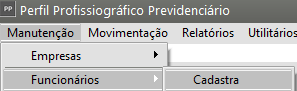
<span style="color: rgb(0, 0, 0); font-family: Arial; font-size: small;">Por exemplo: </span><span style="color: rgb(0, 0, 0); font-family: Arial; font-size: small;">Se você acessar o menu **Manutenção&gt;Funcionários&gt;Cadastra**</span>

[![image.png](https://autoatendimento.grupoallegus.com.br/uploads/images/gallery/2023-08/scaled-1680-/X0zimage.png)](https://autoatendimento.grupoallegus.com.br/uploads/images/gallery/2023-08/X0zimage.png)

Em seguida clicar no Botão ajuda existente na tela de cadastro do Funcionário;

[![image.png](https://autoatendimento.grupoallegus.com.br/uploads/images/gallery/2023-08/scaled-1680-/Xfsimage.png)](https://autoatendimento.grupoallegus.com.br/uploads/images/gallery/2023-08/Xfsimage.png)
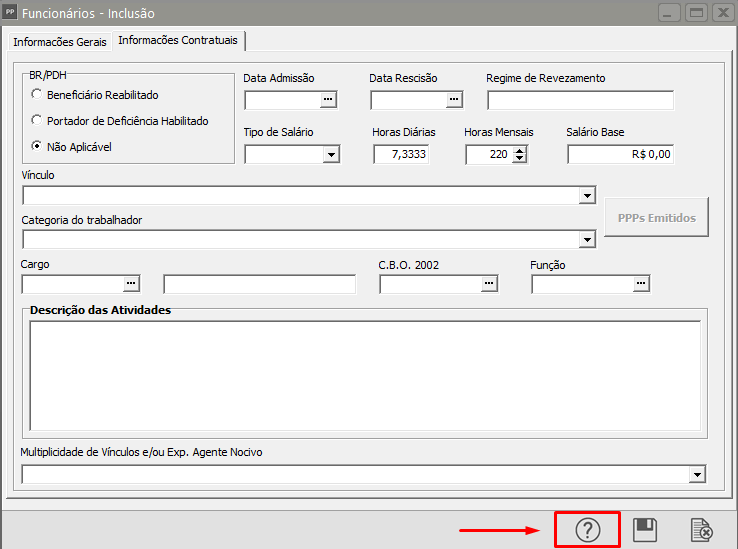
<span style="color: rgb(0, 0, 0); font-family: Arial; font-size: small;">Será apresentado a tela com as explicações da tela de cadastro do Funcionário,[ ](https://autoatendimento.grupoallegus.com.br/books/ppp/page/cadastrando-funcionarios)</span>[<span style="color: rgb(0, 0, 0); font-family: Arial; font-size: small;">link: </span>](https://autoatendimento.grupoallegus.com.br/books/ppp/page/cadastrando-funcionarios)